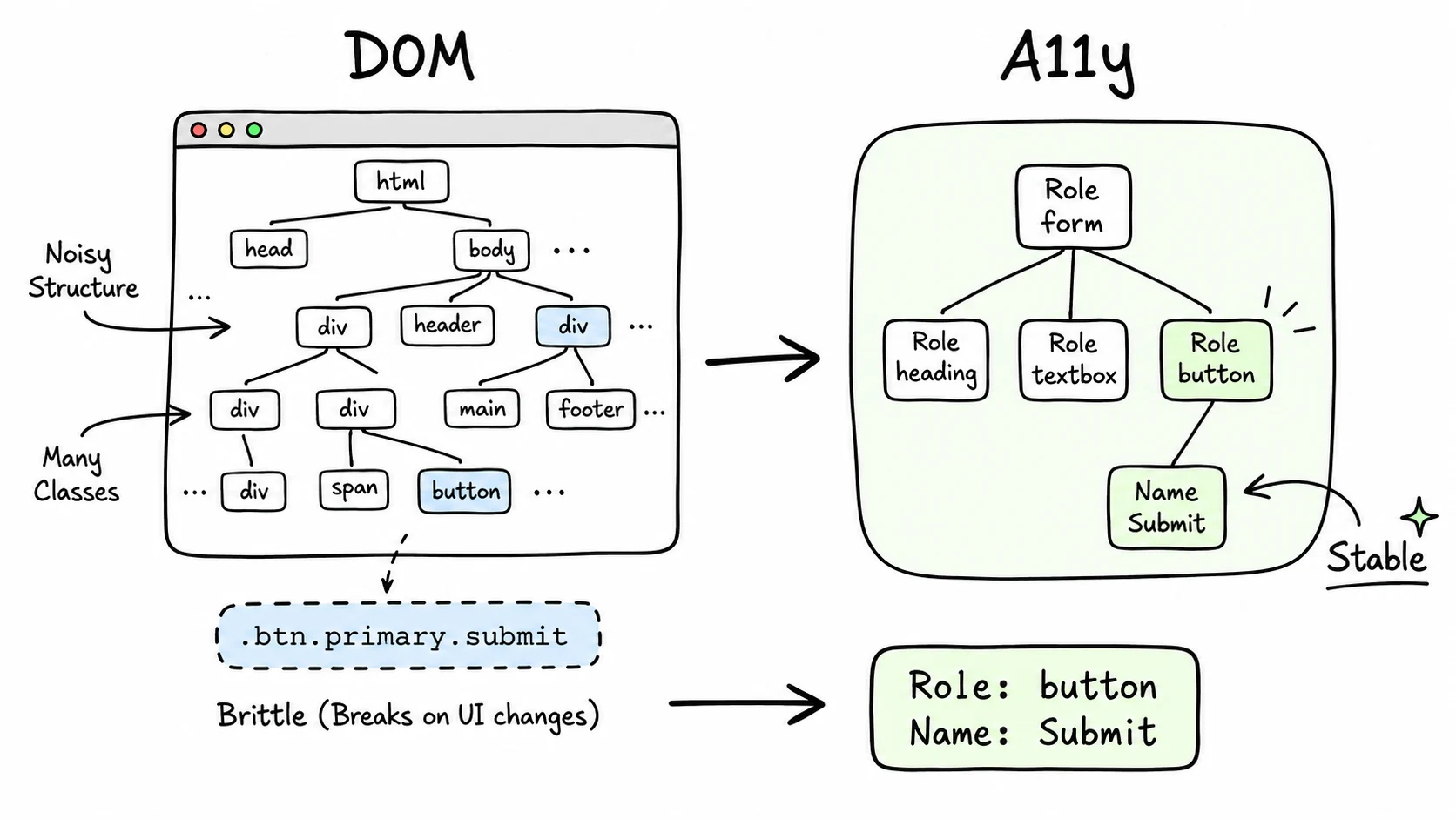
Every e2e test suite has the same failure mode. A designer moves a button. The CSS class changes from btn-primary to btn-action. Twenty tests break. Not because the button stopped working, but because the tests were looking for a class name instead of a button. CSS selectors encode where an element is in the DOM. Semantic selectors encode what it is. That distinction turns out to be the foundation for browser agents that actually work.
The brittleness problem
CSS selectors are tightly coupled to the DOM. They depend on class names, element nesting, and tag positions, all of which change routinely during UI refactors. Component libraries introduce wrapper nodes for spacing or accessibility. CSS frameworks generate new class names on every build. A deeply chained selector like div.container > section.main > div:nth-child(3) > button.submit breaks the moment any intermediate container changes.
The data backs this up. One production case study documented flaky test rates dropping from 40% to under 5% across a suite of 230 tests after switching to stable selector strategies. That's 6 hours per week in test maintenance and debugging eliminated by changing how elements are found, not what's being tested.
The evolution of selector strategies in test automation tells the story clearly:
| Strategy | Example | Survives Redesign? | Problem |
|---|---|---|---|
| CSS selector | .btn-primary | No | Breaks when classes change |
| XPath | //div[3]/button | No | Verbose, fragile, position-dependent |
| data-testid | [data-testid="submit"] | Yes | Requires developer cooperation |
| ARIA role | role=button, name="Submit" | Yes | None. It's what the element is |
The first two encode location. The third encodes a testing contract. The fourth encodes meaning. That last distinction matters more than it appears.
The accessibility tree
Browsers maintain two parallel representations of every page. The DOM is the full document structure: every div, every span, every class name. The accessibility tree is a stripped-down representation that encodes what each element is and what it's called: role, name, state.
A <button class="btn-primary btn-lg mt-4">Submit Order</button> in the DOM becomes { role: "button", name: "Submit Order" } in the accessibility tree. The class names, the sizing utilities, the margin. Gone. What survives is the semantic identity.
This is the representation screen readers have used for decades. The WAI-ARIA 1.2 specification defines over 80 roles including button, link, navigation, dialog, tab, menuitem, and dozens more. Each role carries semantic meaning independent of visual presentation. A button looks different on every website, but its ARIA role is the same on all of them.
Screen readers have been solving the "find the button" problem for over twenty years. They did it by ignoring presentation and reading meaning.
How the testing world converged
Playwright made the bet explicit. Its recommended locator hierarchy puts accessibility-tree queries at the top:
getByRole(): queries the accessibility tree by role and accessible namegetByLabel(): finds form controls by their associated labelgetByPlaceholder(): matches by placeholder textgetByText(): matches visible text contentgetByTestId(): falls back to data attributes
CSS selectors aren't even in the priority list. They exist as an escape hatch, not a recommended strategy.
The difference in test stability is well-documented: "when the DOM changes but the meaning stays the same, accessibility tree locators survive." A button's class can change from btn-primary to btn-action and the accessibility tree stays identical. That's why getByRole locators survive refactors that break CSS selectors.
Not every framework took this path. Playwright prioritizes accessibility-tree queries by default, while Cypress defaults to DOM querying via CSS selectors (role-based locators require a plugin), and Selenium has no built-in accessibility tree support at all.
Why this is perfect for AI agents
A browser agent doesn't see your website the way you do. It doesn't process the visual layout, the colors, the spacing. It processes a structured representation of the page. The question is which representation.
Three approaches exist for how AI agents perceive web pages:
Vision (screenshots)
Take a screenshot, feed it to a multimodal model, ask it to identify elements. Expensive, slow, and brittle. Pixel positions shift across screen sizes, and OCR on rendered text is less reliable than reading the text directly.
DOM parsing (raw HTML)
Read the full HTML document. The problem: a modern web page has thousands of DOM nodes, most of which are structural noise: wrapper divs, SVG internals, CSS utility classes. Feeding raw DOM to an LLM wastes context tokens on information that carries zero semantic signal.
Accessibility tree parsing
Read the stripped-down semantic representation. A page with 3,000 DOM nodes might produce an accessibility tree with 200 entries. Each entry tells you what the element is (role), what it's called (name), and what state it's in (disabled, expanded, checked). That's exactly the information an agent needs to decide what to click.
The industry is converging on option three. OpenAI's Computer-Using Agent (CUA), which powers both Operator and Atlas, layers screenshot analysis with DOM processing and accessibility tree parsing, but prioritizes ARIA labels and roles. It falls back to text content and structural selectors when accessibility data isn't available. Research from UC Berkeley and the University of Michigan (as of early 2025) found that Claude's task success rate dropped from 78% to 42% on pages that lacked proper accessibility markup.
The accessibility tree isn't a hack or an approximation. In my testing, it provides roughly 15x compression of the page while preserving the signals an agent needs. Screen readers demonstrated this decades ago. AI agents are demonstrating it now.
How BAP uses semantic selectors
BAP's element identification follows the same hierarchy Playwright recommends, adapted for agent use:
// Priority 1: ARIA role + accessible name
{ role: "button", name: "Submit Order" }
// Priority 2: Label association
{ role: "textbox", label: "Email address" }
// Priority 3: Text content
{ role: "link", text: "View all products" }
// Priority 4: data-testid fallback
{ testId: "checkout-submit" }
// Priority 5: CSS selector (last resort)
{ css: "button.checkout-btn" } In practice, priority 1 and 2 handle over 90% of interactions on well-built pages. The agent says "click the Submit Order button" and BAP finds it by role and name, the same way a screen reader would announce it, the same way a human would describe it.
When a page gets redesigned with a new CSS framework, restructured layout, or different component library, the semantic selectors keep working because the meaning didn't change. The Submit Order button is still a button named Submit Order. The email field is still a textbox labeled Email address. The implementation changed. The semantics didn't.
The accessibility-AI convergence
There's a deeper pattern here. Accessibility and AI agent usability are converging on the same requirements:
| Requirement | Screen Readers Need It | AI Agents Need It |
|---|---|---|
| Semantic HTML | Yes, for role inference | Yes, for element identification |
| ARIA labels | Yes, for element names | Yes, for action targeting |
| Landmark roles | Yes, for page navigation | Yes, for section identification |
| Keyboard navigability | Yes, for interaction | Yes, for reliable element focus |
| Descriptive link text | Yes, for context | Yes, for intent matching |
In my experience, accessibility best practices make a page more agent-friendly, and accessibility failures make agent automation harder. This isn't a coincidence. Both screen readers and AI agents are non-visual consumers of web content. They need the same information: what is this element, what is it called, and what can I do with it.
The WAI-ARIA specification was designed for people who can't see the page. It turns out to be equally useful for machines that can't see the page. The twenty years of work that went into accessibility standards, the roles taxonomy, the naming conventions, the tree structure. All of it is directly applicable to agent-driven web automation.
Beyond testing
This matters beyond e2e tests and browser agents. Semantic selectors represent a shift in how we think about web element identity.
CSS selectors answer: "Where is this element in the document tree?" XPath answers: "What path leads to this element?" Data-testid answers: "What did the developer name this element?" Semantic selectors answer: "What is this element?"
That last question is the only one that's stable across redesigns, framework migrations, and platform changes. A button is a button whether it's built with React, Vue, Svelte, or vanilla HTML. Its ARIA role doesn't change when you switch from Tailwind to vanilla CSS. Its accessible name doesn't change when you restructure your component hierarchy.
Websites that invest in proper semantic markup (native HTML elements, ARIA roles where needed, descriptive labels) are simultaneously investing in accessibility compliance, test stability, and AI agent compatibility. Three outcomes from one practice.
The web was built with visual consumption as the default. The accessibility tree was a secondary representation, added for the subset of users who needed it. Now that AI agents are becoming first-class consumers of web content, the accessibility tree is moving from secondary to primary. The semantic layer that was built for inclusion turns out to be the foundation for automation.
Build accessible pages. The agents will thank you.